
Appearance
What's New
Orbit Lite 1.3.2 (beta)
Beta
Orbit Lite 1.3.2 is in beta for Mac. Everything below may still change before release.
Binaural Rooms
- Choose the room you hear Binaural in: Small Studio (the default), Control Room, Large Room, or Off. The room stays put as you turn your head, and every room plays at the same level as Off. See Binaural Rooms.
- Custom rooms: start from a room, set its Room (−6 to +6 dB) and Tone on two knobs, and name it.
- A room chip in the footer: in Binaural mode, it shows your room and opens a menu of every room.
- Less bass: Binaural has about 3 dB less low end than before.
Apple Spatial Audio
- The footer's Apple Spatial menus are now Music | Cinema, a Level slider, and two switches: Head Tracking and Personalised. See Monitoring Modes.
Preferences
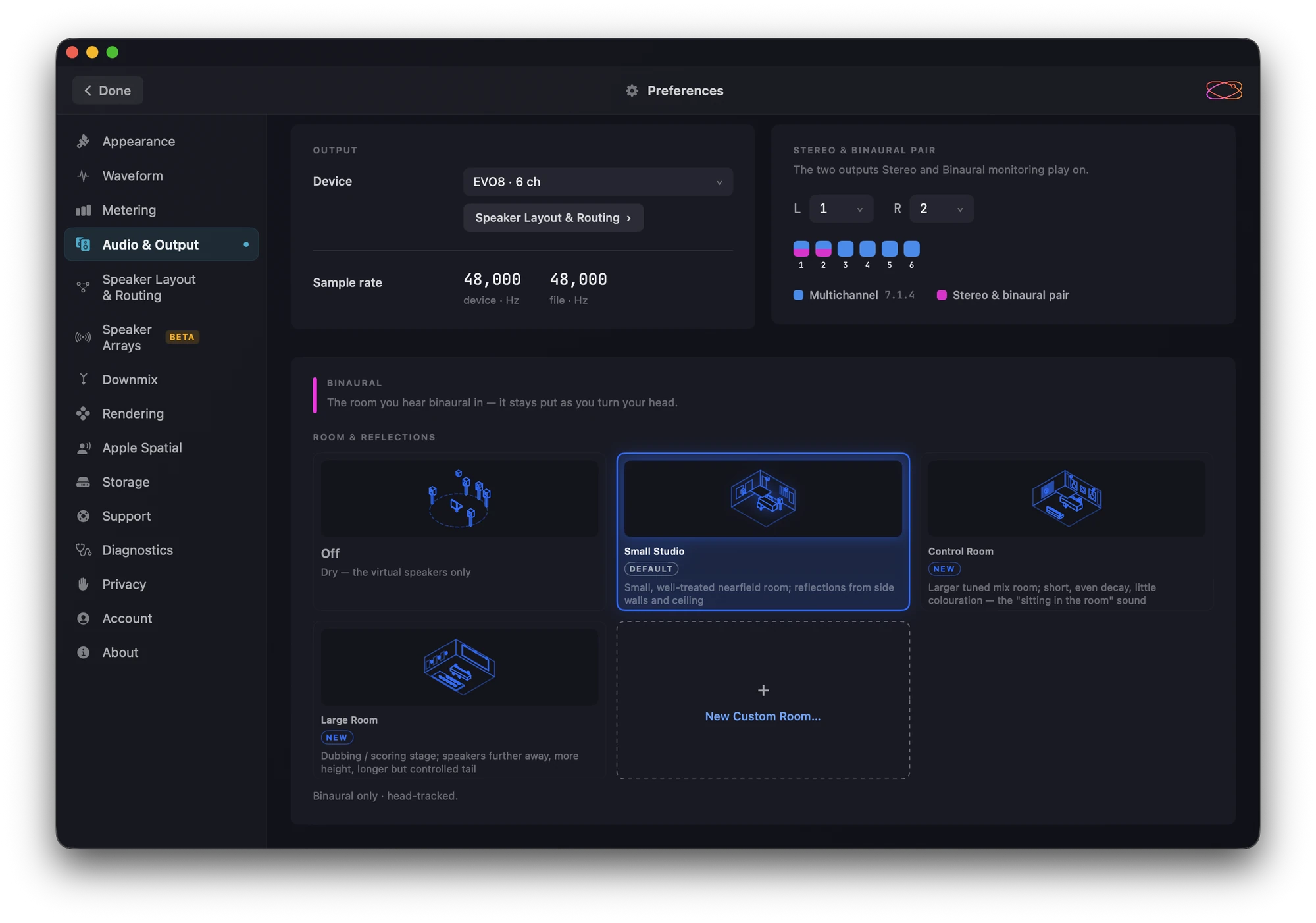
- Preferences has a new design, matching Orbit's.
- Speaker Arrays (beta): choose which speakers play each channel when your room has more speakers than the mix has channels, as in Orbit 1.5.9.
- Audio & Output has a Binaural panel with the room cards.
- Account now sits just above About. It shows your email address masked, for example
b••••@icloud.com.
Intel Macs
- Orbit Lite now runs on Intel Macs as well as Apple Silicon (beta). Apple Spatial Audio isn't offered on Intel.
Under the hood
- The loading screen no longer shows your email address.
- On the Welcome and licence screens, the background now reaches the top of the window.
Orbit Lite for iPhone and iPad
Orbit Lite is out on the App Store for iPhone and iPad, from 21 October 2026. It needs iOS 17 or iPadOS 17 or later.
- The same engine, monitoring modes and Compare checks as Orbit Lite 1.3 for Mac, laid out for a touch screen.
- Free to download, with a 14-day trial in the app. Sign in with your Orbit Spatial account to use one of your licence's device seats, or buy Orbit Lite for iOS in the app (£14.99 at launch).
- See Orbit Lite on iPhone & iPad for what's different from the Mac app.
Orbit Lite 1.3.1
Orbit Lite 1.3.1 for Mac follows the final IAMF 2.0 specification and moves to the latest Orbit audio engine.
IAMF 2.0
- IAMF / Eclipsa Audio files open and play the way the published IAMF 2.0 standard describes. Files that declare the new Base-Advanced, Advanced-1 and Advanced-2 profiles open, alongside Simple, Base and Base-Enhanced. Object-based audio written in the approved 2.0 format plays with its positions intact.
- Object files made by early Orbit betas, in the pre-2.0 draft format, still play.
- A file Orbit Lite can't open now says why in one plain sentence, such as "This IAMF file uses a profile Orbit doesn't support yet", instead of a generic error.
- When part of a file can't be played as written, Orbit Lite names it and keeps it silent rather than playing it wrong.
- Preferences ▸ Diagnostics has a new IAMF section: the file's profile, and anything in it that is silenced or plays differently.
- See IAMF in Orbit Lite for the profiles, codecs and layouts Orbit Lite plays.
Compare
- The Compare screen's title no longer shows a leftover Beta badge. Compare has been part of Orbit Lite since 1.3.0.
Under the hood
- Every object in a master now renders, up to Orbit Lite's limit of 128 objects. A file with more objects than that is refused when it opens, with the reason, rather than losing objects silently.
- A few descriptions in Preferences are reworded.
Orbit Lite 1.3
Orbit Lite 1.3 adds Compare: A/B your immersive master against its stereo master, with the checks that matter for QC. It also brings a 7.1.4 timeline view, a waveform for every programme, and a new Welcome and licence screens.
New features
- Compare (stereo master A/B). Add the stereo master beside the immersive master and switch between them, sample-locked. File ▸ Compare… (⌘⇧O) opens the Compare screen, and ⌘⇧A flips between Immersive and Stereo Master. Orbit Lite checks channels, codec, sample rate, length and level, and tells you plainly when something differs. Stereo masters must be WAV, AAC or MP3. See Compare (A/B).
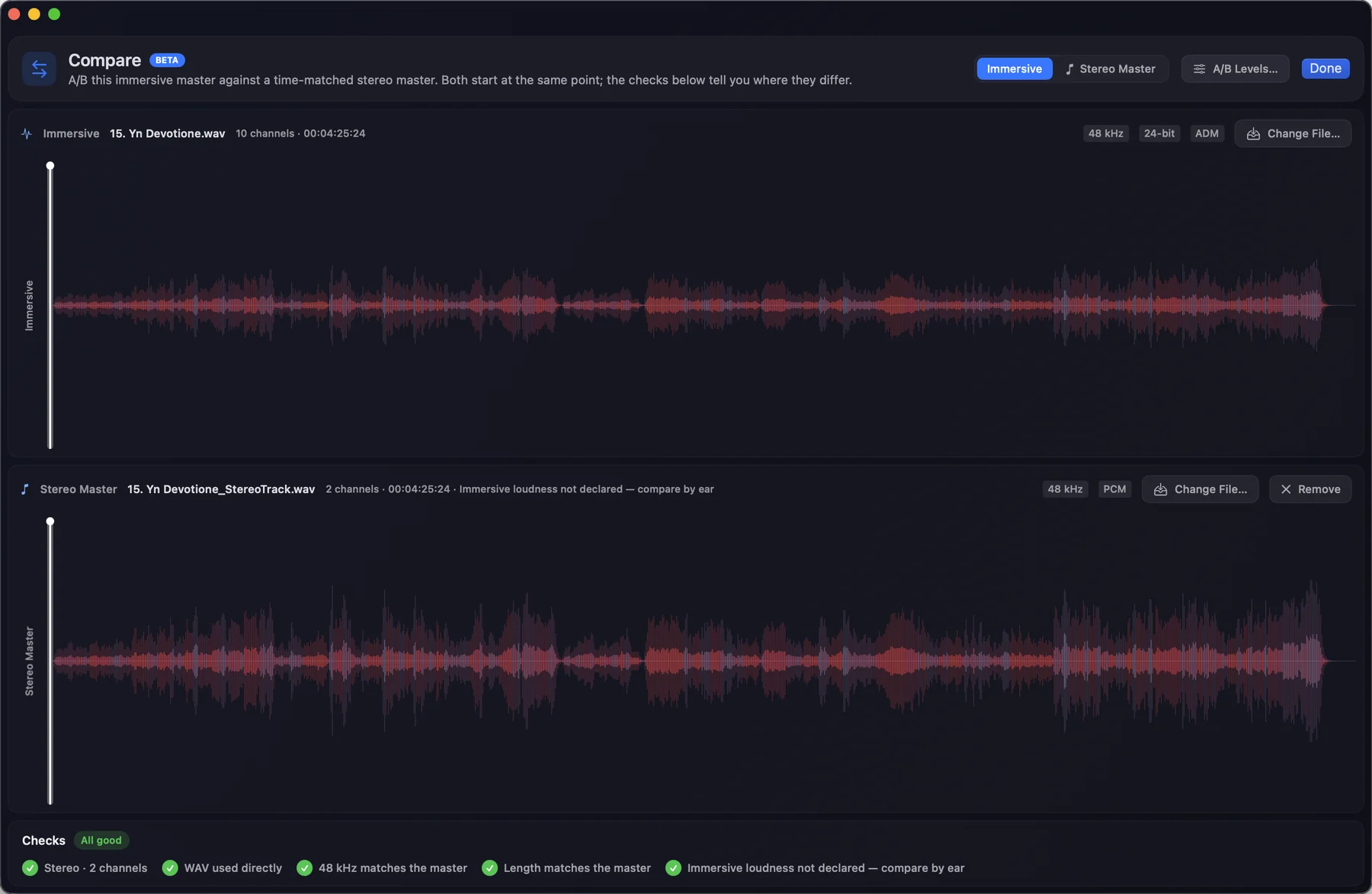
- A transport bar in two halves. Your immersive master and your stereo master sit side by side, each with its file name, channel count, duration and format. The side you're listening to is tinted.
- Timeline views. The timeline has a view switch: Spatial, 7.1.4 and A/B. 7.1.4 draws the twelve lanes of the 7.1.4 bus, coloured by speaker role, so you can see which speakers carry the level. It is also in the View menu and Settings. A/B stacks the immersive master over the stereo master on one time scale.
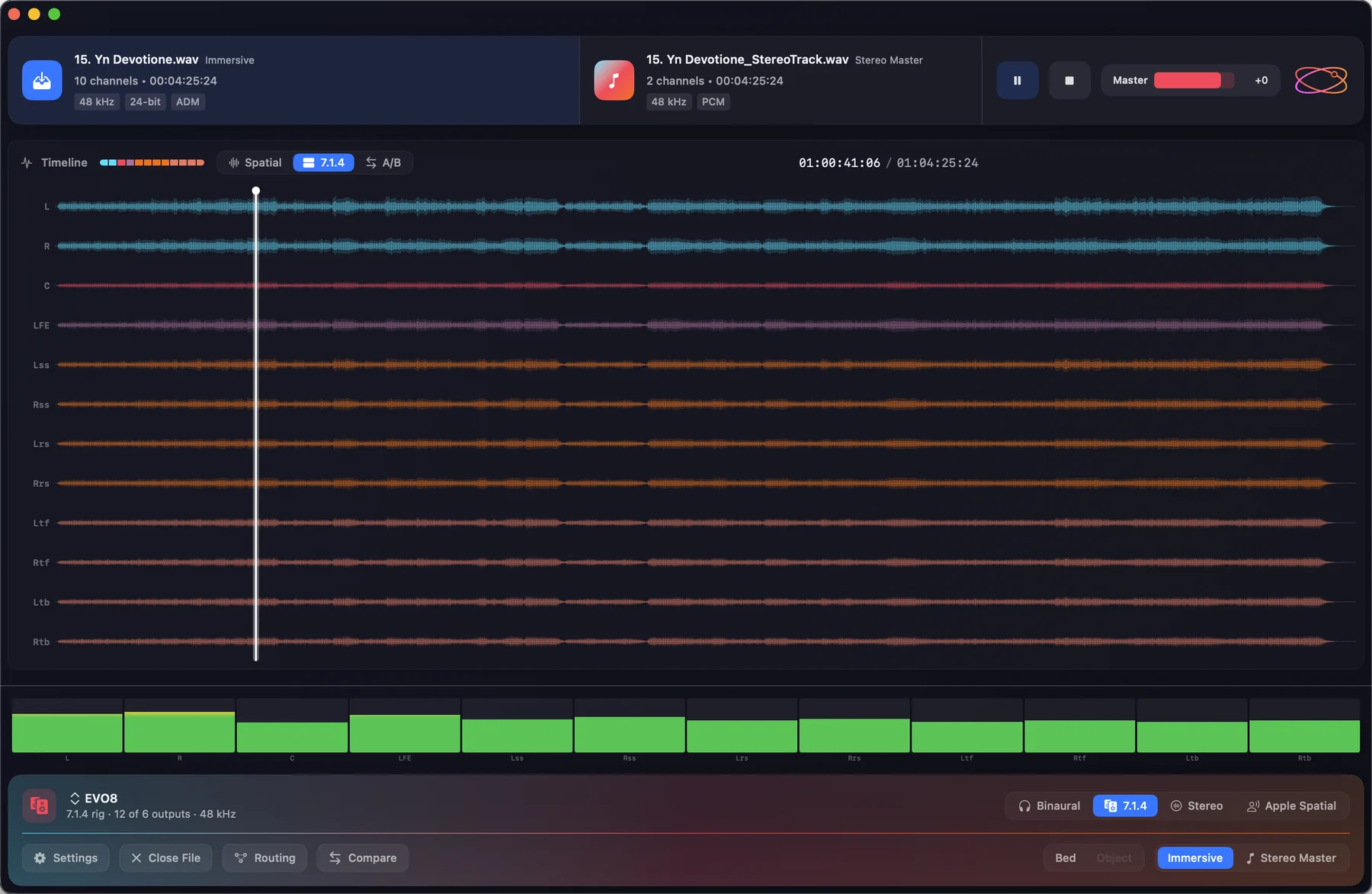
- A waveform for every programme. A master with more than one ADM programme or IAMF mix presentation now opens on the waveform of the one you're hearing. Choose another from the pill in the timeline header, labelled Programme for ADM and Mix for IAMF. Each waveform is kept beside the file once drawn, so switching back is instant. See Content Switching.
- A new Welcome. Open a file, Open with video and Compare each say what they're for. Your recent masters sit under Continue, with Clear. When you're signed in, the top right shows your licence in words, and an updates card shows what's new or the update that's waiting.
- Licence screens that explain themselves. Signing in, starting a trial, entering a key and every other licence state now has its own screen saying what has happened and what to do. Activating a Mac is always a click you make. Temporary licences now say Temporary, not "trial".
- Your account, your devices. Manage Licence… shows which licence this Mac uses, every device on it with when it was last seen, and lets you switch licence or sign out. Release every Mac now emails you a 6-digit code first.
Improvements
- About now shows one line of facts: version, build, channel, processor and the OrbitCore it runs on.
- New footer. The footer is a card that matches the transport bar: output and monitoring on top, controls below, tinted with your waveform theme.
- Clicks, seeks and menus respond instantly again.
Bug fixes
- Multi-programme masters that mix a bed with an Ambisonics group now draw the Ambisonics content in the right programme.
Orbit Lite 1.2
Orbit Lite 1.2 is a big step up — IAMF playback (with video), custom speaker layouts, and a new engine under the hood.
New features
- IAMF / Eclipsa playback — Orbit Lite now opens and plays IAMF files (
.iamfand IAMF-wrapped.mp4) alongside ADM BWF. The file picker accepts both, drag-and-drop works the same, and every monitoring mode (7.1.4, Binaural, Stereo, Apple Spatial) renders IAMF correctly. - IAMF video playback — open an IAMF / Eclipsa Audio MP4 that carries a video track and the picture plays in sync with the spatial audio.
- New welcome screen — a redesigned launch screen, just like Orbit's, with quick actions and a Recent files list. See Getting Started.
- Full-screen player — a distraction-free full-screen view with a floating transport bar (play/pause, scrub, master volume, monitoring mode) that auto-hides after 2.5 seconds. See Getting Started.
- Custom speaker layouts (OSLS) — describe any rig in an
.oslsfile and Orbit Lite will output to it, plus a full set of built-in layouts. Capped at 24 channels in Lite. See Output Routing. - Output routing matrix — the same matrix patcher from Orbit is now in Orbit Lite for mapping speakers to device outputs.
- Sample-rate mismatch warning — when the audio device rate differs from the file's, a banner offers a one-click Match device to file. See Sample-rate matching.
- Ambisonics / scene-based (HOA) solo — a third solo button joins Bed and Obj when a file contains Ambisonics (ADM BS.2076-3 HOA) or scene-based audio (IAMF). Shortcut 3; 0 clears all solos.
Improvements
- New OrbitCore 1.8 engine — Orbit Lite now runs on OrbitCore 1.8.x, the latest version of the shared Orbit Spatial audio engine, powering IAMF, the sample-rate banner and HOA solo.
- Format-aware throughout — buttons, menus and labels read in IAMF terminology for IAMF files and ADM terminology for ADM files.
- Smoother meters and playhead — the meters and timeline cursor no longer freeze while you drag the volume slider or hold a menu open.
- Lighter idle load — the app uses a new event-driven engine surface for transport, sample-rate and limiter readings, doing less work each frame.
Bug fixes
- macOS 26 waveform-cache crash — reading the waveform cache no longer trips a stricter alignment check on newer macOS.
- Solo buttons now solo — Bed and Obj solo previously did nothing; both now correctly isolate their audio elements.