
Appearance
Headphone EQ Preferences
Different headphones have different frequency responses, and that response colours every binaural mix. The Headphone EQ panel lets you load a measured compensation curve for your specific headphones — drawn from a curated catalogue baked into the engine — and optionally layer a five-band tone stack on top for taste. For background on what headphone compensation does and why it matters, see Headphone EQ.
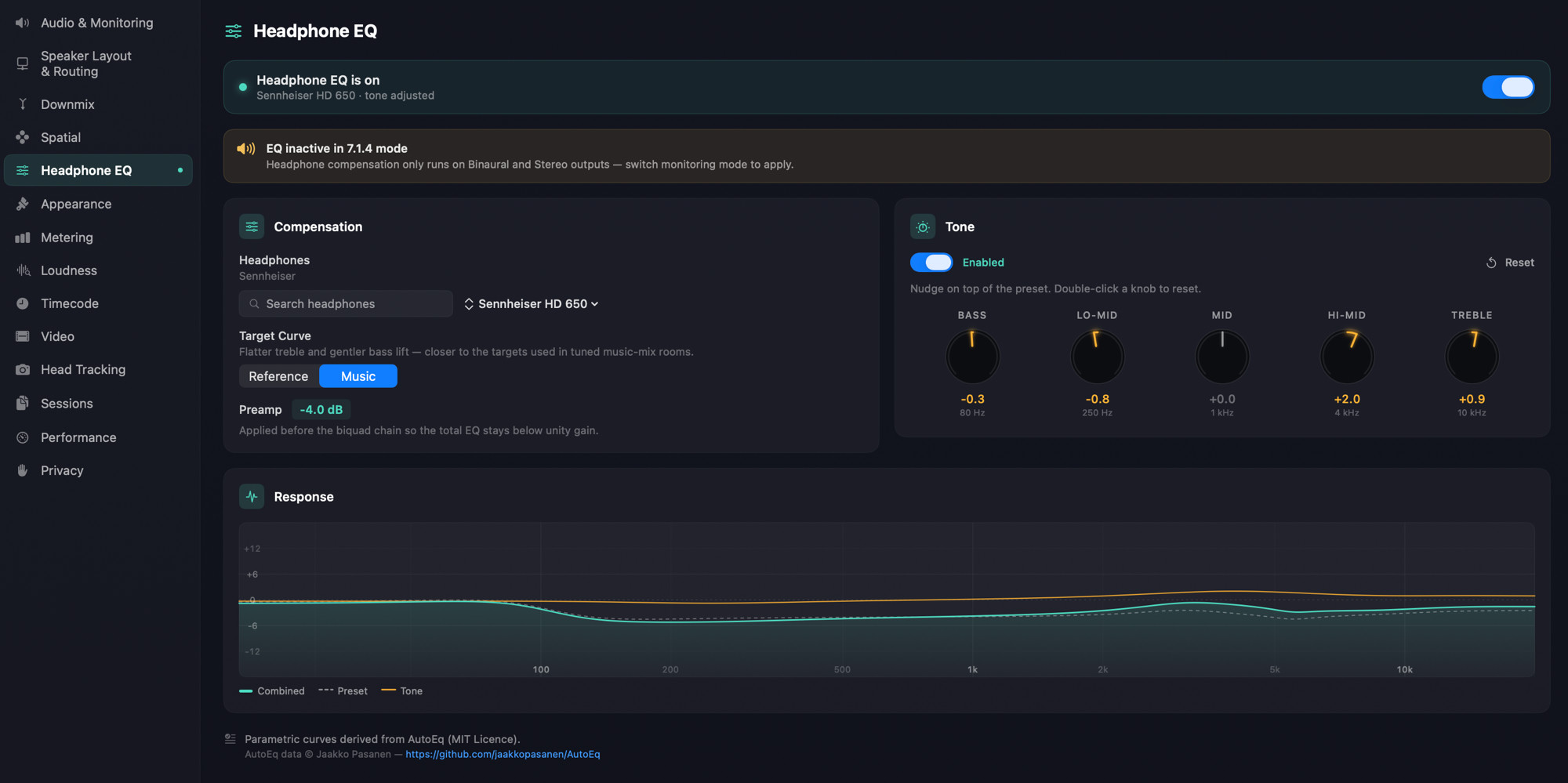
What this panel controls
The Headphone EQ chain is active only in Binaural and Stereo monitoring modes — those are the modes that route audio to headphones. In Multichannel mode, the panel is configurable but its output is not in the signal path, and a status banner at the top of the panel (EQ inactive in 7.1.4 mode) reminds you of that. In Apple Spatial Audio mode, Apple's own renderer handles output and the EQ chain is bypassed.
Master toggle
A full-width on/off switch at the top of the panel. When off, the entire EQ chain — preset, target curve, tone stack — is bypassed. Default is on.
Profile picker
A searchable list of headphone models, grouped by category, drawn from a curated catalogue baked into the engine. Type in the search field to filter by name or manufacturer.
The first entry is None (bypass) — pick this for headphones that aren't in the catalogue, or when you want to monitor without compensation. Loading a profile applies its parametric biquad chain (a measured frequency-response compensation) on top of the binaural feed.
Available headphones
Every entry below offers both Reference and Music target curves. Listed in three categories matching the picker's grouping; pick whichever entry matches your headphones, or None (bypass) if your model isn't here.
Catalogue last updated: 2026-04-22.
Pro Open-Back
- AKG K701
- AKG K702
- AKG K712 Pro
- Audeze LCD-5
- Audeze LCD-X (2021)
- Audeze MM-500
- Beyerdynamic DT 1990 Pro (analytic)
- Beyerdynamic DT 880 Pro (250Ω)
- Beyerdynamic DT 990 Pro (250Ω)
- Focal Clear
- Focal Utopia (2022)
- HiFiMAN Ananda
- HiFiMAN Arya (Stealth Magnet)
- HiFiMAN Edition XS
- HiFiMAN HE1000se
- HiFiMAN Sundara (post-2020)
- Meze Elite
- Neumann NDH 30
- Sennheiser HD 600
- Sennheiser HD 650
- Sennheiser HD 660 S
- Sennheiser HD 800 S
- Sony MDR-MV1
Pro Closed-Back
- AKG K371
- Audeze LCD-XC
- Audio-Technica ATH-M40x
- Audio-Technica ATH-M50x
- Beyerdynamic DT 770 Pro (250Ω)
- Beyerdynamic DT 770 Pro (80Ω)
- Dan Clark Audio Stealth
- Sennheiser HD 280 Pro
- Shure SRH1540
- Shure SRH840A
- Sony MDR-7506
- Sony MDR-M1ST
- Steven Slate VSX (Original)
Consumer
- Apple AirPods Max
- Apple AirPods Pro (2nd gen)
- Bose QuietComfort Ultra
- Sennheiser Momentum 4 Wireless
- Sony WH-1000XM5
Target curve
Every profile offers two target curves: Reference — the Harman over-ear 2018 target, AutoEq's default, with a slight bass shelf and gently falling treble — and Music, with a flatter treble and a gentler bass lift. The Target Curve picker is always shown; it's disabled while None (bypass) is selected.
Preamp
A read-only display showing the gain applied before the biquad chain to ensure unity output. Computed from the profile's measured peaks; you can't edit it directly. Lower values (−6 dB or below) on a profile usually mean the headphone has a sharp peak somewhere that needed cutting.
User tone stack
Layered on top of the AutoEq chain — a five-band parametric EQ for personal taste adjustments.
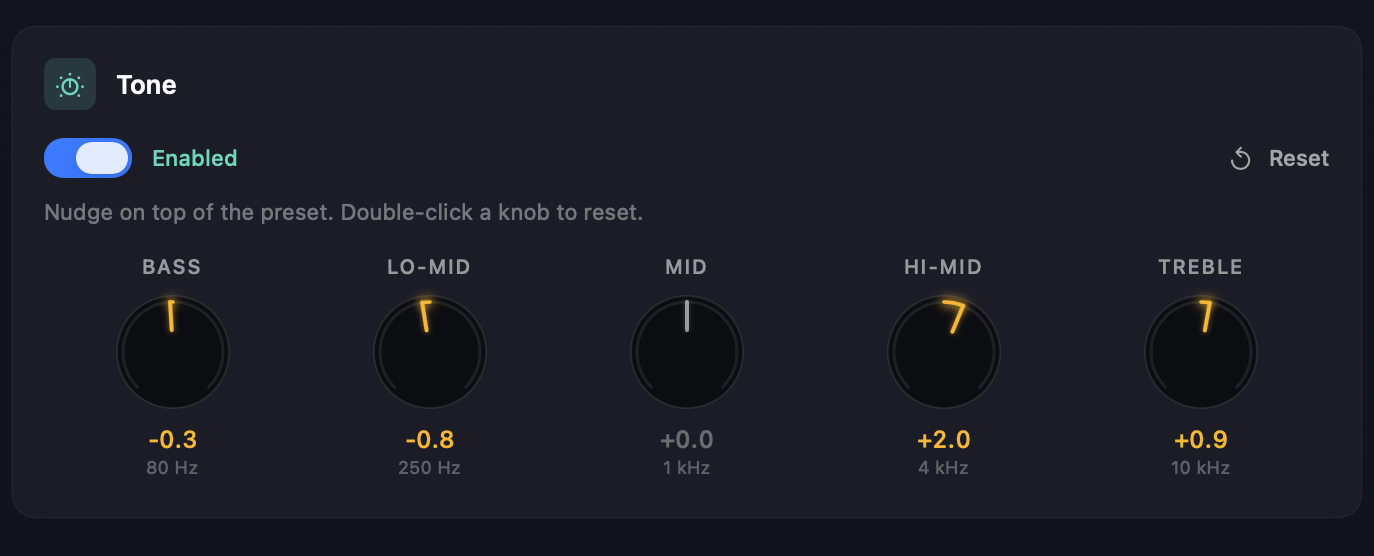
Tone Enable turns the entire tone stack on and off without losing the knob settings.
Reset zeroes every band. Disabled when all bands are already at zero.
The five bands are fixed centre frequencies with shelving / bell shapes:
- Bass — 80 Hz low shelf
- Lo-Mid — 250 Hz bell
- Mid — 1 kHz bell
- Hi-Mid — 4 kHz bell
- Treble — 10 kHz high shelf
Each knob ranges ±12 dB. Double-click a knob to reset it to 0.
Response curve
The canvas at the bottom of the panel shows the combined frequency response of the EQ chain so you can see what you're applying:
- Filled trace — the combined response (preset + tone stack + master state).
- Dashed trace — the AutoEq preset response only.
- Amber trace — the user tone stack response only.
Useful when you're fine-tuning the tone stack and want to see how it interacts with the underlying compensation.
See also
- Headphone EQ — the feature guide, including where the catalogue data comes from and how profiles are selected.
- Monitoring — the binaural and stereo monitoring modes that activate the EQ chain.