
Appearance
Spatial Preferences
Preferences ▸ Spatial covers how objects pan across your speakers, and how Ambisonics content is decoded to them. Most of these settings have a "right" answer for a given workflow — broadcast versus music, IAMF versus ADM, reference monitoring versus a QC sweep — and the wrong one can shift levels by a couple of dB without changing anything else on screen, so it's worth knowing what each does.
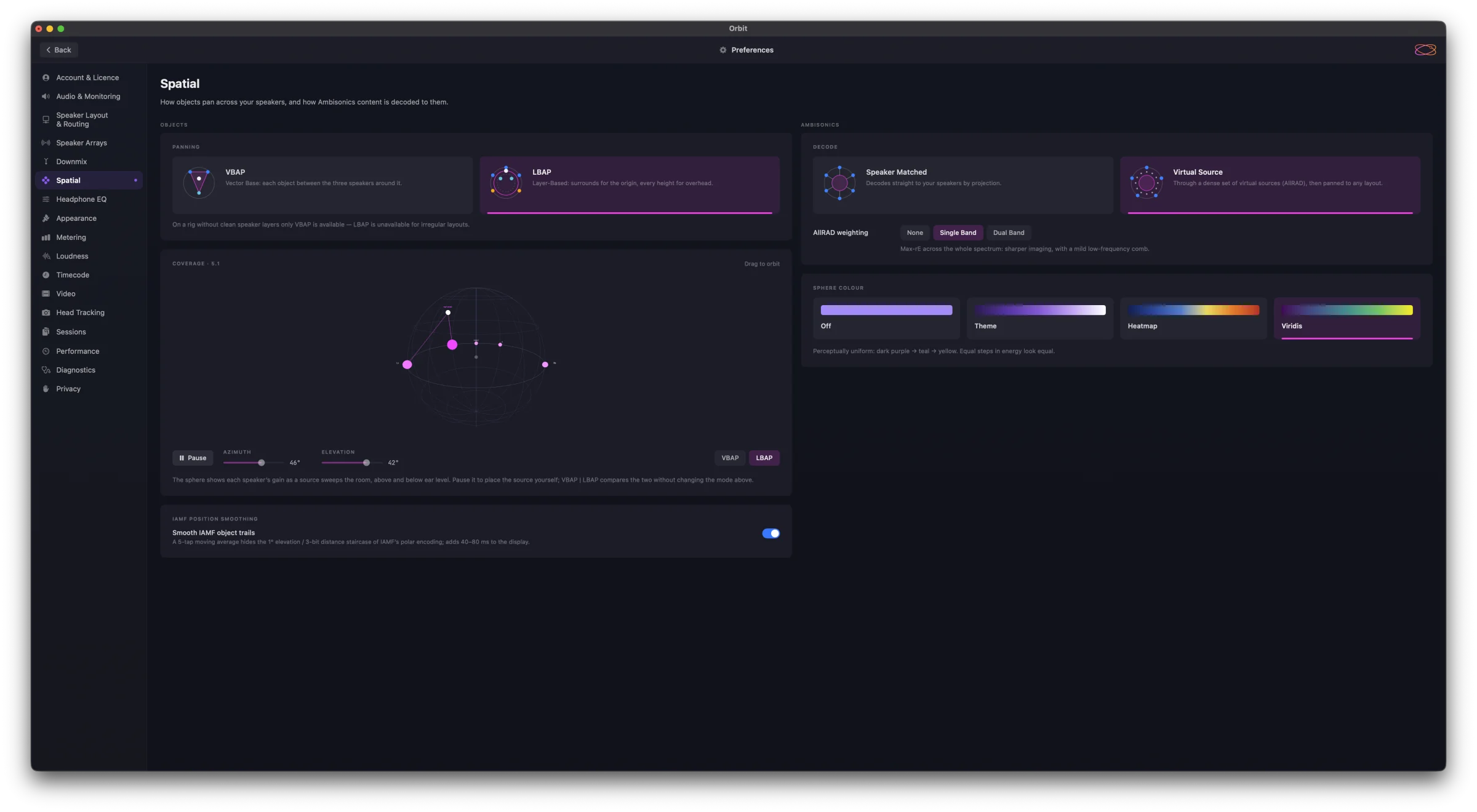
Objects
Panning
How objects are panned onto the speaker layout:
- VBAP — Vector Base: each object between the three speakers around it.
- LBAP — Layer-Based: surrounds for the origin, every height for overhead. The default.
On a rig without clean speaker layers only VBAP is available — LBAP is unavailable for irregular layouts.
Coverage
A live sphere of each speaker's gain as a source sweeps the room, above and below ear level, for the layout you're monitoring (the card is titled with it — Coverage · 5.1). It shows which panning law is actually in effect, not just which is selected.
- Drag the sphere to orbit it.
- Pause stops the sweep, so you can place the source yourself with the Azimuth and Elevation sliders.
- VBAP | LBAP under the sphere compares the two laws without changing the mode above.
IAMF Position Smoothing
Smooth IAMF object trails — a five-tap moving average on IAMF object positions. IAMF's polar encoding quantises elevation to 1° and distance to eight steps, which shows as a staircase when an object moves slowly; smoothing hides it, at the cost of 40–80 ms of delay on the display. The audio isn't affected. On by default; turned off, you see the raw decoded positions.
Ambisonics
How higher-order Ambisonics (HOA) is decoded to your speakers.
Decode
- Speaker Matched — decodes straight to your speakers by projection: a sampling decoder that's simple, light and predictable.
- Virtual Source — decodes through a dense set of virtual sources (AllRAD), then pans them to any layout, for a smoother, more even spread. The default.
AllRAD weighting
Applies to Virtual Source decoding:
- None — pure AllRAD with no spectral compensation: the most diffuse imaging. For reference measurement and EBU conformance checks.
- Single Band — max-rE across the whole spectrum: sharper imaging, with a mild low-frequency comb.
- Dual Band — max-rE above a 380 Hz Linkwitz-Riley crossover: low-frequency timbre kept, imaging sharpened up top. The studio default.
See Ambisonics Decode Modes for more.
Sphere Colour
The palette for the Ambisonics sphere in the 3D scene — purely visual:
- Off — fixed purple; points respond to level by size and opacity only.
- Theme — the Orbit palette, deep purple → lilac → white; loud regions brighten toward white.
- Heatmap — thermal, deep blue → yellow → red; loud regions light up hot.
- Viridis — perceptually uniform, dark purple → teal → yellow; equal steps in energy look equal.
See also
- Monitoring — the monitoring modes.
- Metering — the level-meter scale and theme.
- Loudness — delivery targets and how loudness is measured.