
Appearance
Loudness
Orbit measures loudness to ITU-R BS.1770-5, so you can check a master against your delivery spec. Loudness is shown in the footer's Loudness section — Powered by Cota — and in the QC PDF report. Targets and measurement are set in Preferences ▸ Loudness.
For the per-channel level meters (and meter scales), see Meters & Levels.
Readings can differ from Orbit 1.5.8
From 1.5.9, Orbit measures exactly to ITU-R BS.1770-5, with no extra height-channel weighting, and the 5.1 reading always uses the standard ITU-R BS.2127 fold-down. The option to boost the heights by 1.5 dB and the choice of 5.1 method are gone. Files you've measured before are measured again once, so the figures you see are the new ones.
The footer loudness readout
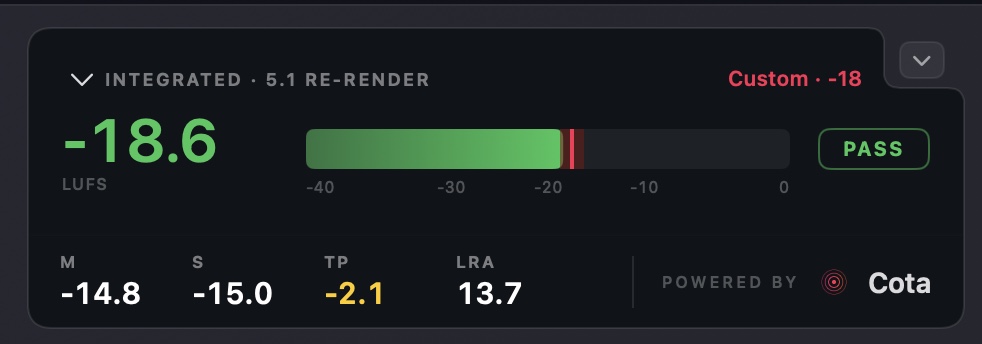
The main figure is the integrated loudness, on a live meter against your chosen delivery target, with a Pass, Warn or Fail badge (green, amber, red; — when there's nothing to measure yet). The true-peak readout is coloured against the true-peak ceiling. Beneath it are the momentary (M), short-term (S), true peak (TP) and loudness range (LRA) readouts.
Powered by Cota
Cota is our dedicated loudness plugin and framework. Orbit embeds Cota's engine, so the footer gets its look, feel and clarity — and every reading is ITU-R BS.1770-5, measured by the Cota engine.
On immersive loudness
Because Orbit uses its own renderer, loudness figures won't line up perfectly with another renderer such as the Dolby Atmos Renderer — that's the nature of immersive, so test on every renderer you can. For Atmos-specific delivery, make the final check against official Dolby tools (or Cota on a 5.1 output from the Dolby Atmos Renderer). Orbit's loudness is verified against the standard tests defined in ITU-R BS.1770, EBU R128 and more.
Preferences ▸ Loudness
Delivery targets
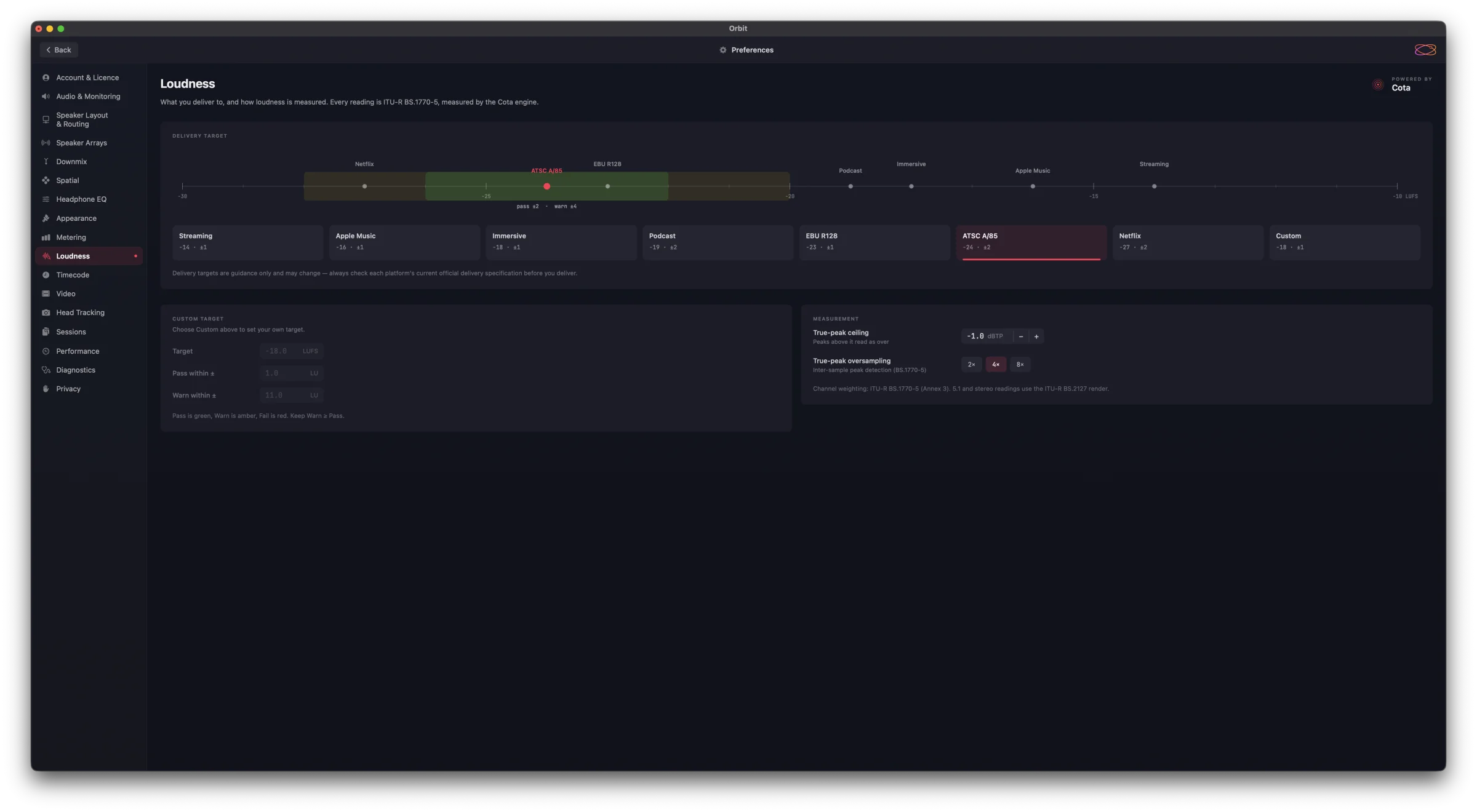
Pick a Delivery Target to check your master against a platform's spec. The scale across the top marks every target on one LUFS axis, and shades the chosen one's pass (green) and warn (amber) bands, so you can see how far apart the specs sit.
| Target | Integrated | Pass within |
|---|---|---|
| Streaming | −14 LUFS | ±1 LU |
| Apple Music | −16 LUFS | ±1 LU |
| Immersive | −18 LUFS | ±1 LU |
| Podcast | −19 LUFS | ±2 LU |
| EBU R128 | −23 LUFS | ±1 LU |
| ATSC A/85 | −24 LUFS | ±2 LU |
| Netflix | −27 LUFS | ±2 LU |
| Custom | your value | your tolerance |
For the presets, Warn extends to twice the pass band, and anything beyond is Fail. Choose Custom to set your own under Custom Target: Target (LUFS), Pass within ± and Warn within ± (LU). Pass is green, Warn is amber, Fail is red — keep Warn at least as wide as Pass.
Guidance only
Delivery targets are guidance only and may change — always check each platform's current official delivery specification before you deliver.
Measurement
- True-peak ceiling — peaks above it read as over (default −1.0 dBTP). The footer's true-peak readout turns red above the ceiling, orange within 1 dB of it and yellow within 3 dB.
- True-peak oversampling — 2×, 4× or 8×: how finely inter-sample peaks are detected (BS.1770-5).
Channel weighting follows ITU-R BS.1770-5 (Annex 3), and the 5.1 and stereo readings use the ITU-R BS.2127 render.
Related
- Meters & Levels — the per-channel level meters and meter scales.
- QC PDF Report — measured loudness in the exported report.
- Metering preferences — the meter scale and theme.
- Cota — the loudness plugin and framework Orbit's engine is based on.